The Next-Gen Database Workspace
for Modern Workflows
A native, blazingly fast database IDE for modern multi-engine workflows — PostgreSQL, MySQL, MariaDB, SQLite, DuckDB, Cloudflare D1, native MongoDB and Redis support, plus a built-in S3-compatible object storage browser for AWS S3, R2, MinIO, and more.


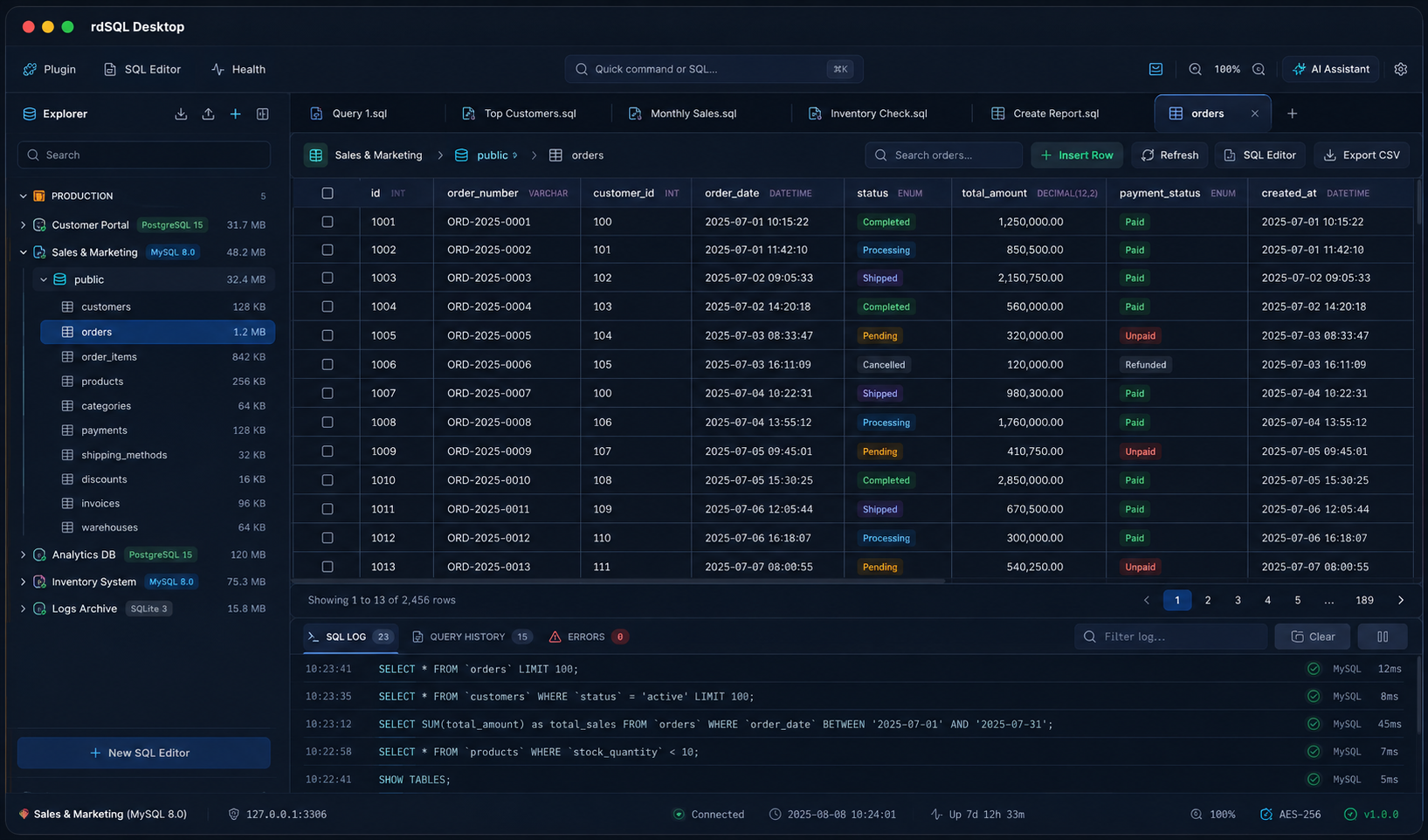




Engineered for High-Productivity
Everything you need to query, manage, migrate, and diagnose database environments.
Multi-Engine Client
Connect directly to PostgreSQL, MySQL, MariaDB, SQLite, DuckDB, Cloudflare D1, CockroachDB, YugabyteDB, TiDB, and PlanetScale with zero driver middleware or remote proxies — plus native MongoDB and Redis connections in the same workspace.
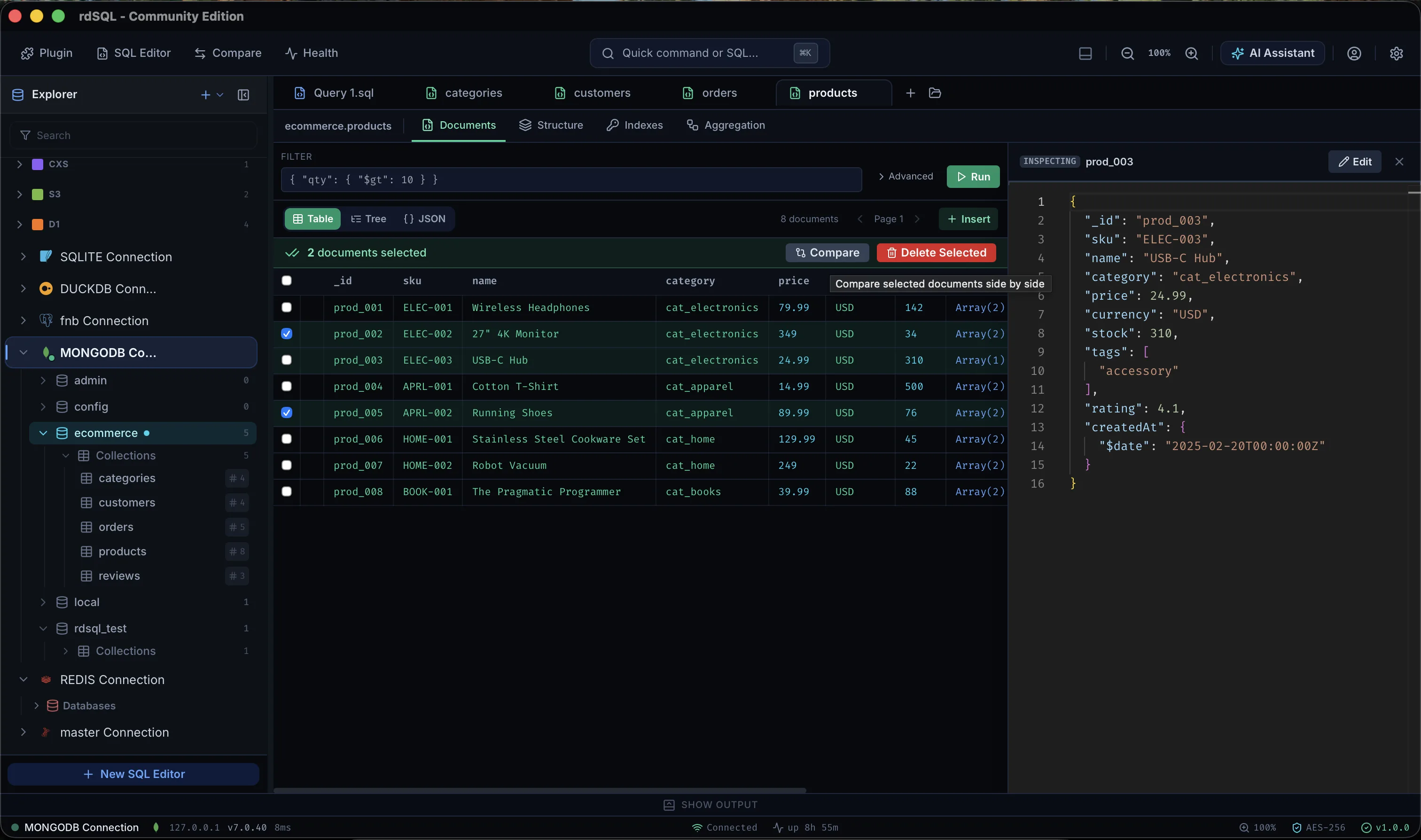
MongoDB Document Store
Browse databases and collections in the same schema-tree Explorer as your SQL connections, run filter queries and aggregation pipelines, and edit documents with full BSON fidelity via MongoDB Extended JSON v2 (ObjectId, Date, Decimal128, and more).
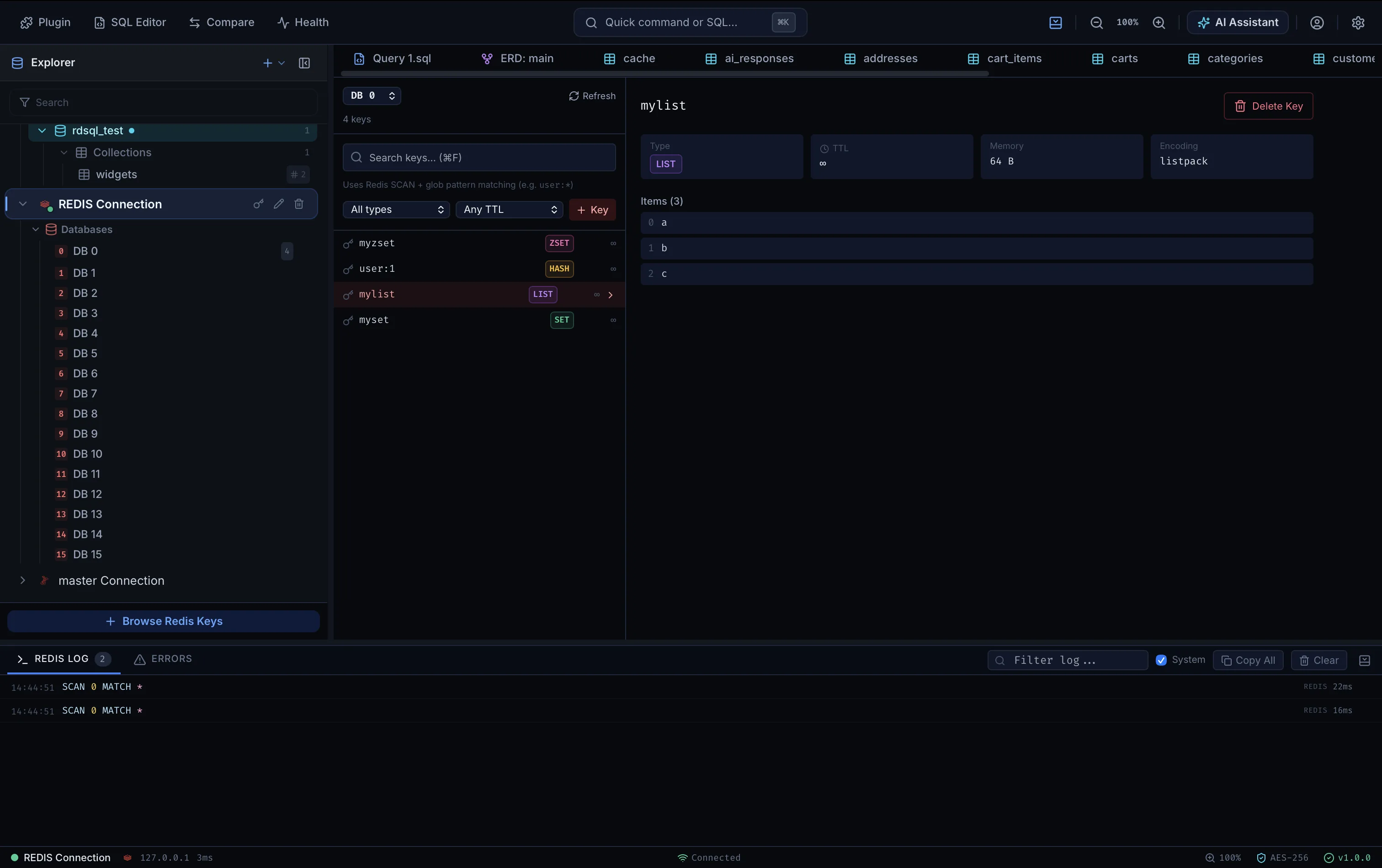
Redis Key-Value Browser
Scan keys across all 16 logical databases with glob pattern and type filters, inspect TTL, memory, and encoding, and edit STRING, HASH, LIST, SET, and ZSET values inline.
DuckDB Analytics Engine
Run high-performance analytical queries on local DuckDB files with full type support — List, Struct, Map, Enum, Union, and rich numeric types, all introspected natively.
Explorer & Schema Browser
Browse tree hierarchies of database schemas, views, columns, keys, triggers, constraints, indexes, and Cloudflare bindings.
Monaco SQL Editor
Write queries inside a full-featured code editor with SQL autocompletion, formatters, custom execution pools, and query logs.
Grid & Inline CRUD
Edit cells directly in fast, virtualized tables, filter results, view JSON contents, stage mutations, and commit edits atomically with Cmd+S.
AI Database Assistant
Schema-aware chat panel that writes, explains, and fixes SQL against your active connection. Bring your own key — OpenAI, Claude, Gemini, OpenRouter, or z.ai — with destructive statements always gated behind a confirmation dialog.
Migration Studio
Compare staging vs development databases, generate DDL schema diff files, and apply migration scripts safely.
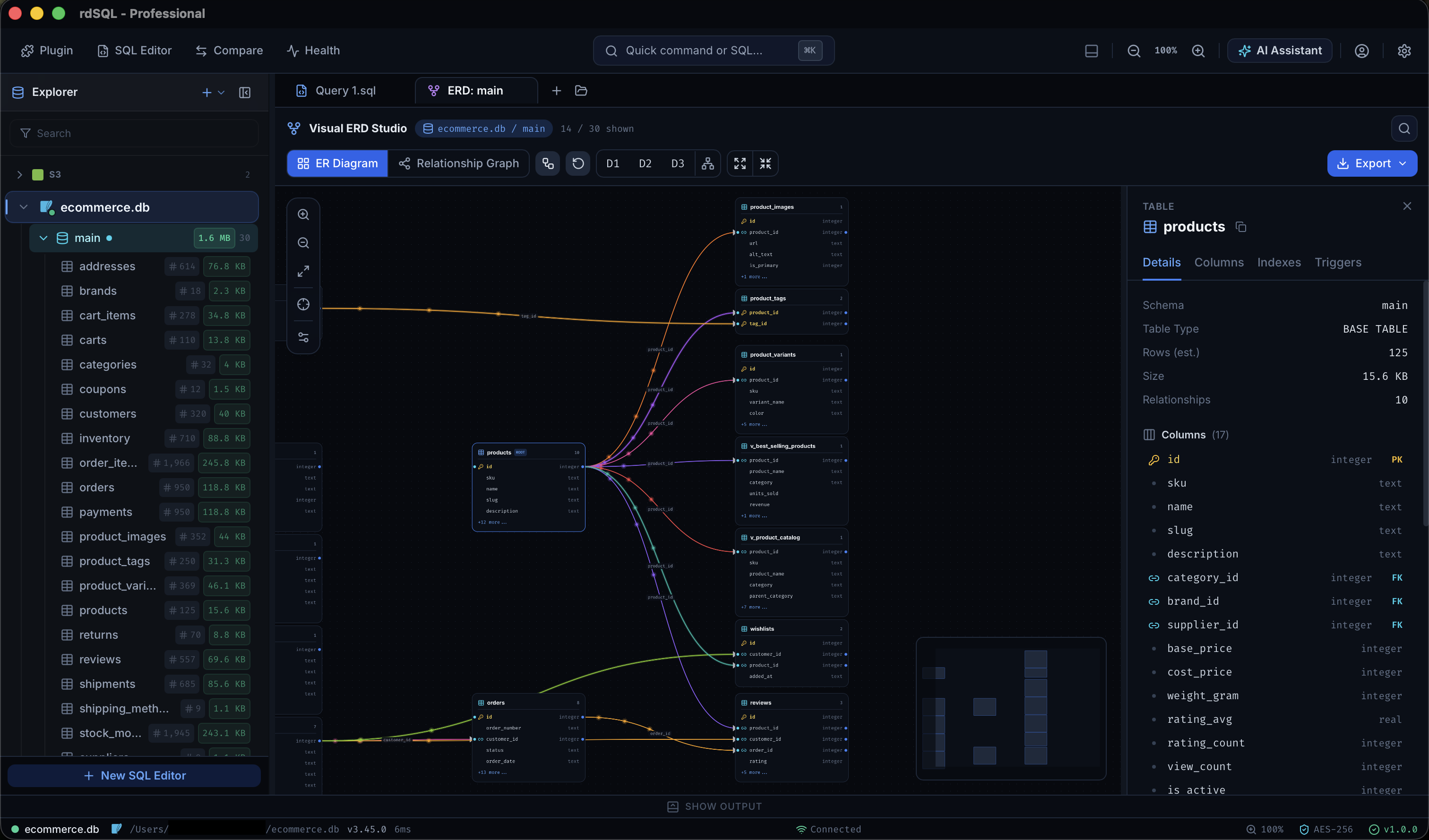
Visual ERD Canvas
Map database schemas visually on an interactive graph with relationship edge-routing, search palettes, and SVG exports.
Schema Compare & Sync
Diff schemas and table data between databases, generate engine-specific DDL sync scripts with safety warnings, and apply changes with type-to-confirm protection on the target.
Row & Document Compare
Select two or more rows in a SQL grid — or two or more MongoDB documents — and compare them side by side in a dedicated modal. Differing fields are highlighted, with an "only show differences" toggle and one-click JSON copy.
Diagnostics & Health
Run health scans, inspect system resource graphs, query activity logs, index sizes, and pinpoint bottleneck queries.
Database Health Score
Transparent 0–100 health score with per-category breakdown — every deduction links to its underlying diagnostic, so you always know exactly what to fix and why.
Automated Repair Center
Execute recommended auto-fixes like creating missing indexes, analyzing tables, and repairing foreign keys instantly.
Backup & Restore Studio
Export zipped dumps, compress backups, encrypt files, set custom target folders, and run restorations seamlessly.
Users & Privileges
Manage login roles and database access for PostgreSQL and MySQL/MariaDB — create and drop users, grant permissions, and inspect role assignments per host.
Encrypted Connections
Secure your data transfer using native SSL/TLS handshakes, SSH tunnels, and encrypted client-key credential storage.
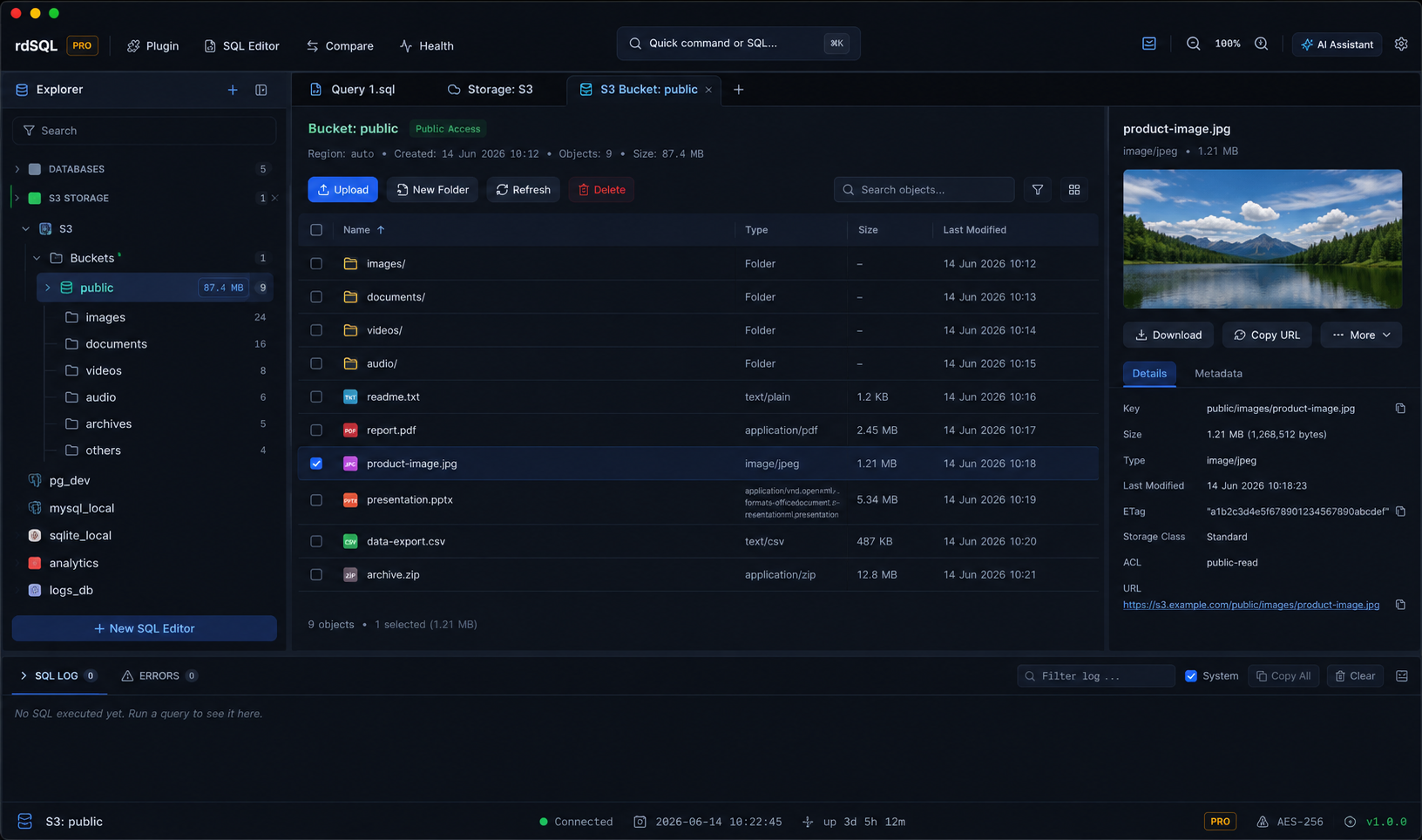
S3 Object Storage Browser
Browse, upload (multipart), download, and manage objects across AWS S3, Cloudflare R2, MinIO, Backblaze B2, and DigitalOcean Spaces — with presigned URLs, ACLs, and in-app previews.
Storage Transfer Manager
Track uploads and downloads with real-time progress, smoothed transfer speed, ETA, cancellation, and batch operations — multipart uploads with bounded concurrency and automatic retry.
Ecosystem & Plugins
Extend workspaces with custom drivers (ClickHouse, Snowflake, and more), custom formatters, and themes like Dracula.
A Single Desktop Workspace
for all your SQL Needs
Say goodbye to heavy, bloated developer panels. rdSQL Desktop starts in milliseconds, loads millions of rows without breaking a sweat, and keeps your data completely secure on your own local device.
No Telemetry by Default
Your database credentials, query logs, and record sets never touch a cloud server unless you explicitly opt in to encrypted sync — and even then, sync is end-to-end encrypted on your device, so rdSQL can't read it either.
Blazingly Fast Performance
Engineered with a native Rust asynchronous network driver pool for ultra-low database latency.
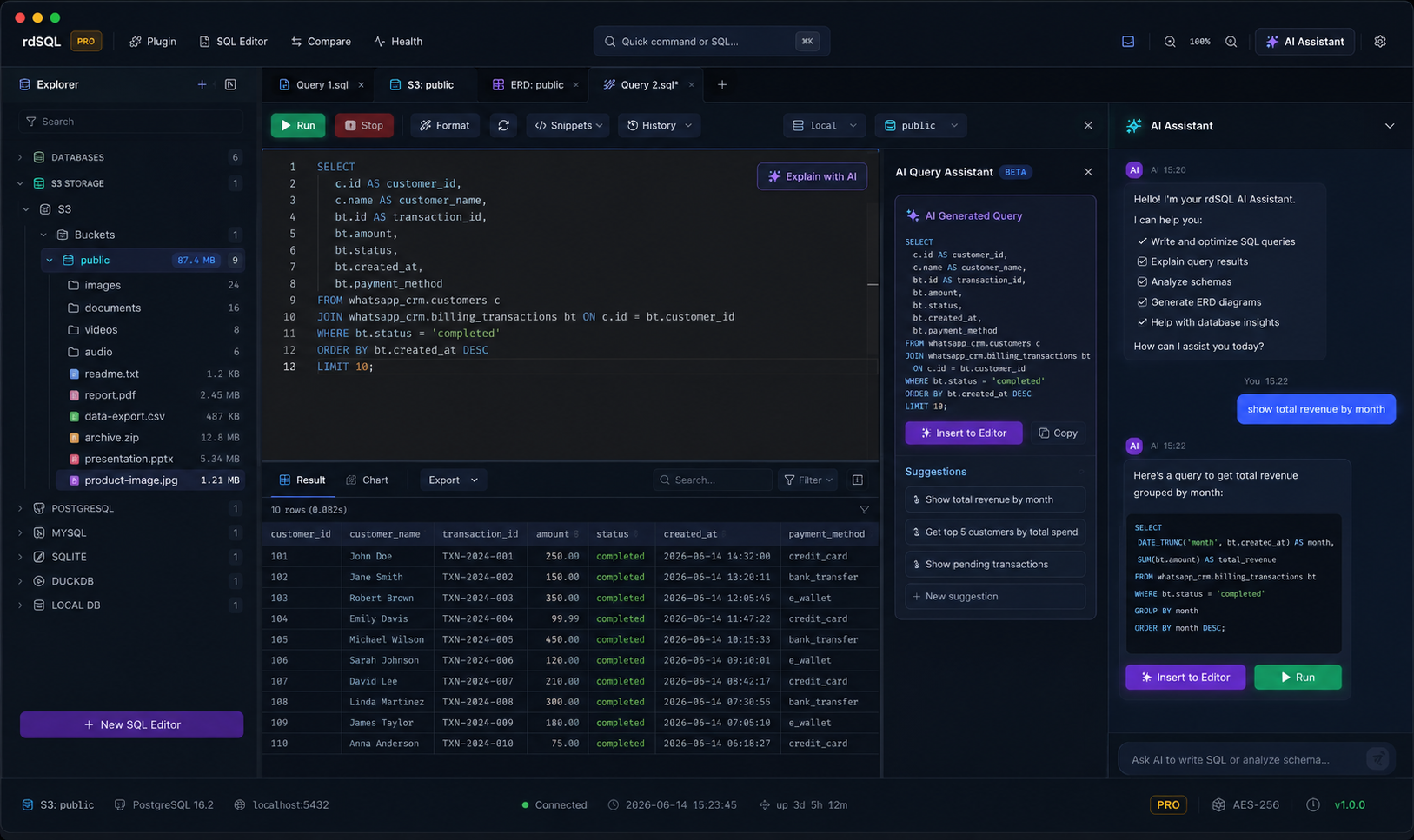
An AI Assistant That
Actually Knows Your Schema
Chat side-by-side with your database. The assistant reads your active connection's tables, columns, and keys, so it writes SQL against your real schema instead of guessing — and it's always bring-your-own-key, never a hosted rdSQL service.
Bring Your Own Key
Connect OpenAI, Anthropic Claude, Google Gemini, OpenRouter, z.ai, or any OpenAI-compatible endpoint. Keys stay local — requests go straight from your machine to the provider.
Schema-Aware by Default
Every prompt is grounded in the active connection's real tables, columns, and relationships — generate, explain, or fix queries in context.
Confirm Before Anything Destructive
Reads run instantly. Any INSERT, UPDATE, DELETE, or DROP stops at a dialog showing the exact SQL and target connection first.
Works with
 OpenAI
 Anthropic
 Google
 Ollama
 OpenRouter
 z.aiOllamaz.aiOpenAIOpenRouterAnthropicGoogleOpenRouterOpenAIz.aiAnthropicGoogleOllamaAnthropicOpenRouterGooglez.aiOllamaOpenAIOpenAIAnthropicGoogleOllamaOpenRouterz.aiOllamaz.aiOpenAIOpenRouterAnthropicGoogleOpenRouterOpenAIz.aiAnthropicGoogleOllamaAnthropicOpenRouterGooglez.aiOllamaOpenAI
See Your Whole Schema,
Laid Out Automatically
Every table, column, key, and foreign-key relationship rendered on an interactive canvas the moment you connect — no manual dragging, no separate diagramming tool to keep in sync.
Auto-Layout Relationship Graph
Tables and foreign keys are mapped onto a React Flow canvas with automatic edge-routing — zoom, pan, and rearrange freely.
Search & Focus Palette
Jump straight to any table on a large schema with a quick search palette instead of hunting across the canvas.
Export to SVG
Drop a clean, vector diagram straight into docs, wikis, or design reviews — no screenshotting required.
Built-In S3 Storage,
No Separate Tool Required
Browse buckets and objects across AWS S3, Cloudflare R2, MinIO, Backblaze B2, and DigitalOcean Spaces in the same workspace as your databases — switch between a query and a bucket without ever leaving the app.
Multipart Transfer Manager
Real-time progress, smoothed transfer speed, ETA, cancellation, and batch operations — bounded concurrency with automatic retry on failure.
Presigned URLs & ACLs
Generate presigned URLs and inspect or edit object ACLs directly, with in-app previews for images, text, and JSON.
Every Major S3-Compatible Provider
AWS S3, Cloudflare R2, MinIO, Backblaze B2, and DigitalOcean Spaces — one connection dialog, no per-provider SDKs to configure.
Native MongoDB & Redis,
Right Next to Your SQL
Document stores and key-value caches get the same first-class treatment as SQL databases — a real schema tree, inline editing, and the same AI assistant and Compare tooling, in one workspace.
MongoDB, BSON and All
Databases and collections show up in the Explorer tree; documents round-trip losslessly via MongoDB Extended JSON v2 — ObjectId, Date, Decimal128, and more.
Redis, Every Type
Browse all 16 logical databases, scan keys with glob patterns, and edit STRING, HASH, LIST, SET, and ZSET values inline with TTL and memory shown alongside.
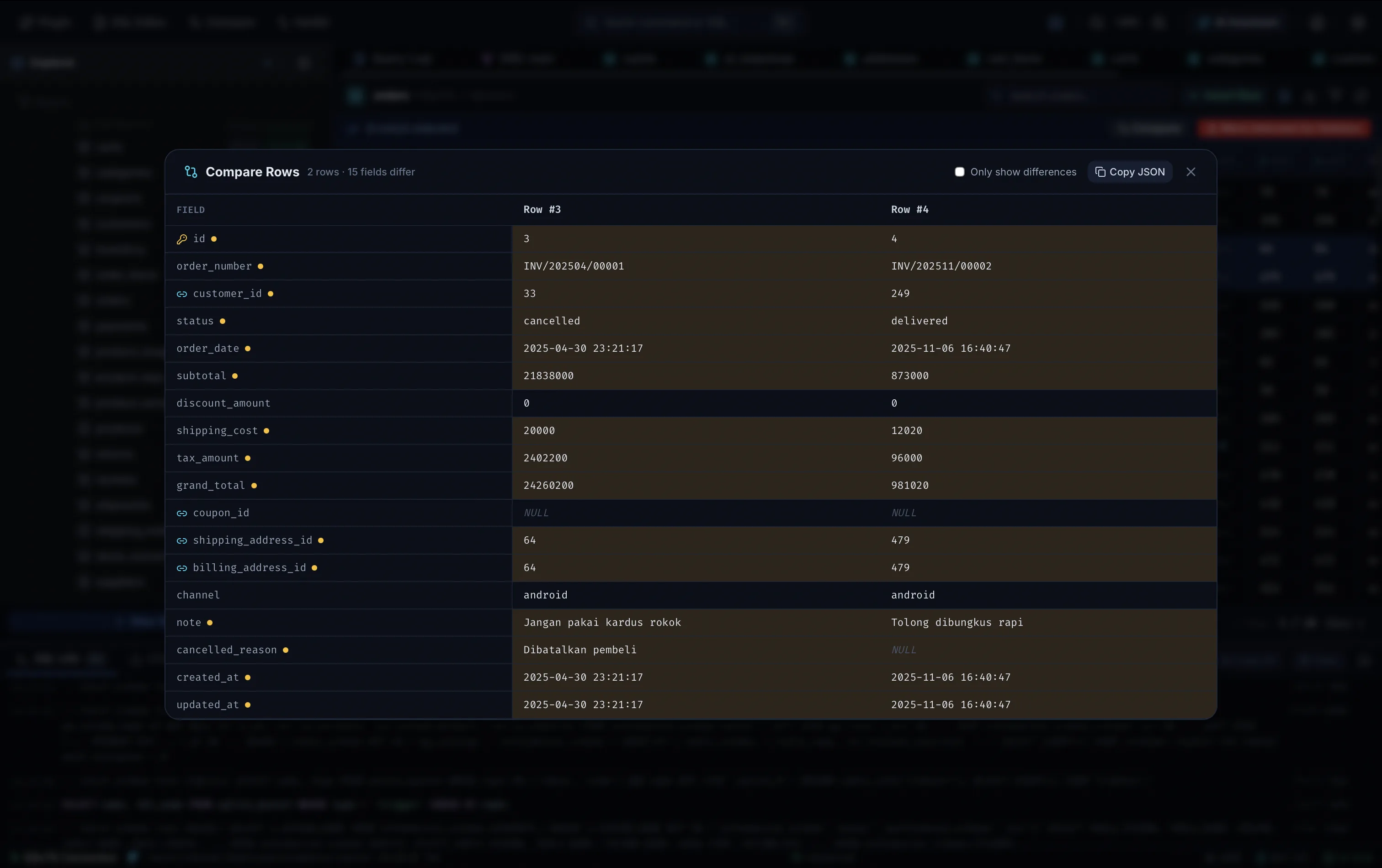
Spot the Difference,
Field by Field
Select two or more rows in a SQL grid — or two or more MongoDB documents — and rdSQL lines them up side by side, one column per record, one row per field, with every difference highlighted instantly.
Works Across SQL and MongoDB
Compare grid rows in any SQL connection, or schemaless MongoDB documents — the union of every field seen across the selection, missing fields included.
Only Show Differences
Toggle out identical fields to focus on what actually changed between the records you selected.
Copy as JSON
Grab the full comparison as JSON in one click to paste into a PR, ticket, or chat.